Search This Blog

Showing posts with label MAC. Show all posts

Monday, May 15, 2023

How to change default browser on MAC !!

Hi Everyone,

Recently, I have had to change the default browser setting from Safari to Chrome or Mozilla. 

An easy way to do this with the following steps:

How to set or change the default browser on MAC:

Step 1. Click on the Apple icon on the left. 

Step 2. Go to System Settings. 
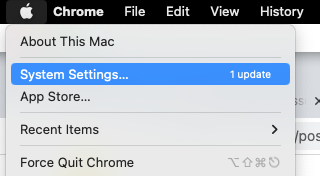


Step 3. Go to the Desktop and Deck option.

Step 4. Go to the Default browser and change the browser. 


That's it, I Hope you can change the default browser now on MAC. 

Cheers !! 

Tuesday, November 26, 2019

How to copy file/folder excluding certain files in MaC/Linux


CP command does not provide option to exclude files.

As an alternate option, we can user rsync which also faster than cp.

for example : To exclude hidden files following can be used.


rsync -r sourcePath targetPath --exclude='.*


Similarly other option can also be explored with  -help.

Cheers,

Kapil

Tuesday, March 19, 2019

How to open multiple instance of an application in MAC


Recently looking option to open multiple Eclipse instances in MAC ( with different workspace).

I did not find just single click option then after some search following command  ( from Terminal) did trick to me :


Applications > open -n -a "APPLICATION NAME"


Ex : open -n -a Eclipse.app


Cheers,

Kapil

Monday, March 19, 2018

How to edit hosts file - MAC


To change the hosts file follow the given steps:

1. Open Terminal 

2. Go to etc dir. cd /etc/
3. Type command : sudo nano hosts and then enter password. 
4. Edit file to your requirement.
5. control + O to save and return
6. control and X to exit and return
7. Type command : sudo killall -HUP mDNSResponder

Cheers, 
Kapil 

Wednesday, February 14, 2018

How to get outlook search option in MAC !!

I was facing issue recently with search in outlook as not able to find search option.

After some research found option to enable using CMD+SHIFT +F and it did trick for me.

Hope it helps.

Cheers

Popular Posts